Thursday, June 2, 2016

Google’s My Account will now help both iOS and Android users find their lost phones

Google has announced an update to its “My Account” service launched last year which will now include a feature that helps users find their lost or stolen phone. You’ll soon be able to find this new option just by googling “I lost my phone,” the company says. While Google already offered tools for Android users with missing devices, this expands Google’s phone-finding help to iOS devices.
Before, Android phone or tablet users could access the Android Device Manager to locate, ring, or remote wipe their device right from the web, similar to Apple’s “Find my iPhone/iPad.” And you could already search Google for “find my phone” to kick off this functionality, too, if you were an Android device owner.
Now, explains the company, users of both iOS or Android devices will be able to access similar options from the My Account page. Via the new “Find your phone” feature, you’ll be able to locate your phone, lock it remotely, call it, secure your account, leave a callback number on its screen, and more.
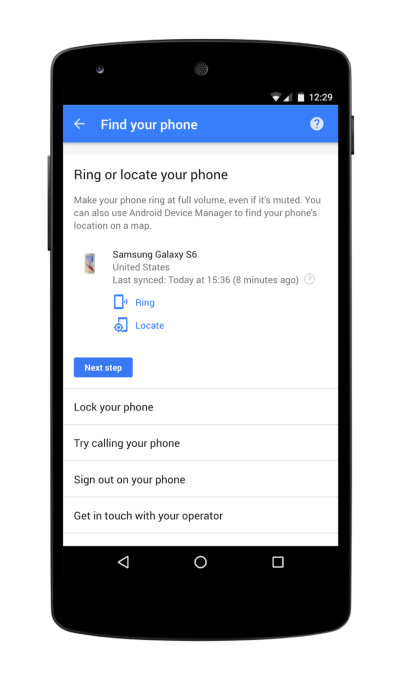
findyourphone
But in testing, it’s clear that Google can’t actually take control of iOS users’ devices. Instead, it directs users to Apple’s iCloud to find and lock their phone. Plus it offers a tool for calling the phone, and lets you sign out of Google services remotely, which is helpful for protecting your account from hacks. It also includes suggestions on how to reach out to your carrier or a local lost and found on Google Maps.
Google is also making it easier to reach the feature, as well as the My Account site in general. In the latter case, the company says that, in the near future, you’ll be able to find the site just by searching Google for your own name.
You’ll be able to launch the site from the Google app, too, by saying “OK Google, show me my Google account.” This works today in English, and support for other languages is coming soon.
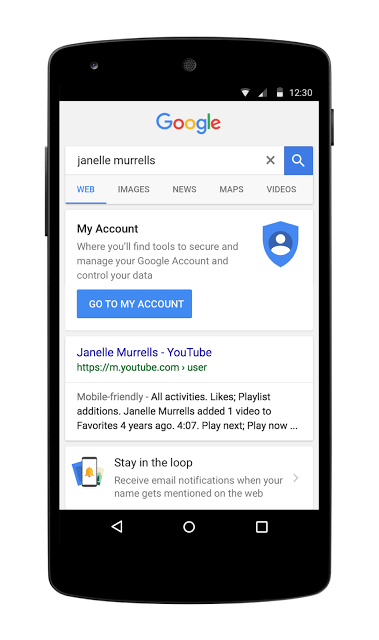
my-account
The My Account site, for those unfamiliar, launched almost exactly one year ago to offer Google users centralized access to privacy and security settings across the company’s services. Today, that includes things like Ads Settings, plus Privacy and Security checkups. The idea is to make it easier to manage and protect your data and privacy as related to Google’s many services in one destination, instead of having to visit each property individually.
To date, over a billion people have used My Account, Google says.
The new “Find your phone” feature is available now, with Google search integration arriving shortly.

Tuesday, December 22, 2015

Say Goodbye to GPS ! India all set to switch to the Desi Navigation System,IRNSS

It's time we move away from the American Global Positioning System (GPS) and make way for our own desi navigation system — the Indian Regional Navigation Satellite System or IRNSS on our mobile phones. 

In October 2015, Isro held a major meeting in Bangalore involving location and navigation device manufacturers, mobile phone manufacturers and global information system (GIS) technology developers  where the advantages of using the IRNSS technology over the current GPS technology was showcased.

Isro feels that seven IRNSS constellation satellites once operational by July next year will be significantly more accurate than the American GPS system.
Unlike American GPS, Isro is recommending a small additional hardware in handheld devices that can receive S-Band signals from IRNSS satellites and inclusion of a code in the phone software to receive L-Band signals.

"Both these L and S-band signals received from seven satellite constellation of the IRNSS are being calculated by a special embedded software which reduces the errors caused by atmospheric disturbances significantly. This, in turn, gives a superior quality location accuracy than the American GPS system," says a senior Isro official. 

All the seven satellites of Indian Regional Navigation Satellite System (IRNSS) are expected to be in orbit by March 2016, Indian Space Research Organisation.
ISRO also aims to make signals available not only to India and surrounding countries but also to the entire globe, ISRO Chairman Kiran Kumar said.

Thursday, December 17, 2015

Pro Tip for Android ADB

Guys who face usb connection issues due to the cable/device can try this

1. Connect the device (after so many attempt)
2. Open cmd, and enter 'adb tcpip 5555'
3. Now disconnect the device.
4. Get the ip address of the device you are using (Settings->Status->Ip Address)
5. Now in cmd, type 'adb connect <ip address from above step>

Check 'adb devices' and you can see the connection to your ip address.

Its very useful for automation execution as well where it can be connected to power source instead of desktop

Note: It doesn't require the device to be rooted.

Wednesday, December 16, 2015

Microsoft's December 3 Office 365 outage: What went wrong

Just under two weeks ago, a number of Office 365 customers in Europe were hit by an outage that lasted several hours.
cloudproblems.jpg
Microsoft officials recently shared some of the behind-the-scenes details regarding what went wrong via an incident report available from the Office 365 Dashboard.I first discovered the report, PIR IS3496, thanks to a blog post from Tony Redmond on the Windows IT Pro site. (I wasn't able to find the incident report in my own Office 365 Dashboard, for whatever reason, but I did get to look at a full copy of it.)
According to that report, the December 3 Office 365 outage lasted approximately four hours, starting at roughly 9 a.m. UTC. The report acknowledged that "many customers served from the European region were affected by this issue." And some customers from other regions who authenticated through Europe also may have experienced problems that day."
Approximately 1% of Outlook and 35% of OOTW (Outlook on the Web) requests were impacted," the report noted.
"Affected users were unable to sign in to the Office 365 portal. Additionally, some users were unable to access Office 365 services, including the SharePoint Online service, Power BI, Microsoft Intune, Yammer, and Exchange Online. For Exchange Online, Outlook on the web (OOTW) users experienced the most impact, but impact to Outlook and Exchange ActiveSync (EAS) mobile devices was minimal," the incident report says.

Additionally, access to the Service Health Dashboard also was hit. Even though Microsoft has a backup "Emergency Broadcast System," (EBS) customers from the European region were unable to see updates to this page due to an EBS failure.
At its root, the December 3rd outage was a sign-in/identity problem. The cause was two-fold, the Softies said:
"1. A recent update exposed a configuration problem between the production and pre-production authentication infrastructure. This resulted in some requests being misrouted and creating a backlog of authentication requests on the Azure Active Directory (AAD) front ends.
2. The backlog of misrouted requests in AAD had a cascading effect that resulted in high system resource utilization, which further compounded the problem as traffic increased during normal business hours in the European region. This led to intermittent authentication request failures within the European Data Centers and caused failures in the AAD authentication service, which resulted in impact to Office 365 services."
What's next for Microsoft to prevent similar issues moving forward?
The company plans to add additional fault-injection techniques to improve its testing procedures, as well as additional fallback mechanisms to allow it to use an older version of the authentication service, the report said.
To thwart the potential for mis-routed requests caused by high CPU utilization, Microsoft plans to add more overload detection and recovery mechanisms and to improve isolation across service endpoints to head off cascading failures, the report added.
As an incorrect content delivery network (CDN) link prevented users from seeing updates on http://status.office.com, Microsoft plans to review its switchover options for cases when access to the Office 365 portal is impacted.
Microsoft's report lists the completion date for all of these next steps as "December 2015."
I asked Microsoft officials if users affected by the December 3 outage will be compensated in some way and was told the company had no comment.
I'm also curious why Microsoft made this post-mortem available as a dashboard report rather than as a publicly facing blog post, as it has in previous cases of Office 365 and Azure outages. Again, no comment from the company on that, either.

Tuesday, September 22, 2015

Sharepoint OOTB Search

Step 1 : Enable Search Service application / if not we need to create the  Search Service Application
Step 2 : Goto SharePoint central admin -> Application Management ->Manage Services on Server.
Step 3 : Start the “SharePoint Server Search” by clicking Start at the right side.
Step 4 : Click Manage service application under Application Management will display a list of Service applications.
Step 5 : Click New Search service application in the ribbon.
Step 6  : Give a Service application Name and click OK will create a new search service application.
Step 7  : Next the Search service application will be configured.
Step  8 : Click on the content source on the right side to configure it
Step  9: Click on the Edit for the Local SharePoint Sites and add the Site URL in the following rectangular space with each site in a separate new line.

Step  10: Please configure an Incremental crawl and a full crawl.

Saturday, August 31, 2013

Open with Explorer View Issue


Resolution / Work Around
Click on Particular Document Libraryàselect “Library” on TabàClick on “Open with Explorer”
If error occurs while opening the document library,

Step1:
Add https://sample.sharepoint.com as trusted site.
(i)                 Toolsà Internet OptionsàSecurity tabàselect Trusted sitesàClick on Sitesà Add https://sample.sharepoint.com
(ii)               Click on Apply and OK.


Step2:
Sign out from the site and clear cookies.
ToolsàInternet OptionsàDelete Cookies.
Now sign in to the site, while signing in, Check Keep me sign in check box.
Step3:
If the browser is IE10 in Windows 7, Download the  below  Package(Windows6.1-KB2846960-x64) and install it.


Download the updates shown inside the Green Rectangle .
If your system is a 32 bit Please download the First one X86.
If your system is a 64 bit Please download the Second one X64

Once the Link is clicked the below


Select the required language and Click “Continue” button
 

Click Save button and once the download is done, install the updates.
Then restart the machine and delete the cookies. Now login to the site. while logging into the site, Check “Keep me Sign in check Box” and go to document library and click on Open with Explorer.